
• Everyday Heroes of Numeric Functions Cleanup: SQL’s Math Magicians at Work

    In the business world, numbers tell the truth—but only if they’re clean, consistent, and well-prepared. That’s where SQL numeric functions come to the rescue.

    Whether you’re dealing with messy discounts, rounding errors, or unknown values, these functions work behind the scenes like quiet superheroes, cleaning and calculating your way to accurate reports.

    Let’s meet the squad:

    1. ROUND() – The Smoother

    Story:

    You’re preparing a billing report, and the prices are showing up like 99.9999. It looks unprofessional.

    Fix:

    SELECT ROUND(Price, 2) FROM Products;

    Result:

    $99.9999 becomes $100.00. Clean, tidy, and presentable.

    2. CEILING() and FLOOR() – The Round-Up & Round-Down Twins

    Story:

    You’re calculating shipping estimates. You don’t want to undercharge or overpromise.

    Fix:

    SELECT CEILING(Weight) AS ShipWeight FROM Packages;
    SELECT FLOOR(Discount) AS AdjustedDiscount FROM Sales;

    Result:

    Always fair—and aligned with business logic.

    3. ABS() – The Peacemaker

    Story:

    Refunds are showing up as -50, but your finance team wants to see them as positive values.

    Fix:

    SELECT ABS(RefundAmount) AS CleanRefund FROM Transactions;

    Result:

    No more confusion over signs. Just clean numbers.

    4. POWER() – The Calculator

    Story:

    You’re calculating compound interest or growth projections. You need exponential power.

    Fix:

    SELECT POWER(1.05, 5) AS FiveYearGrowth;

    Result:

    Growth made easy and accurate.

    5. MOD() – The Validator

    Story:

    You want to find even or odd transactions, or segment records into batches.

    Fix:

    SELECT TransactionID
    FROM Orders
    WHERE MOD(TransactionID, 2) = 0;

    Result:

    Only even-numbered records are returned.

    6. ISNULL() or COALESCE() – The Fallback Hero

    Story:

    Your price column has missing values, and it’s breaking your calculations.

    Fix:

    SELECT ISNULL(Discount, 0) FROM Sales;
    -- or
    SELECT COALESCE(Discount, 0) FROM Sales;

    Result:

    No more blanks—just safe defaults.

    7. AVG(), SUM(), MIN(), MAX() – The Analysts

    Story:

    You want to know your top-performing product, average order size, or lowest shipping fee.

    Fix:

    SELECT AVG(OrderAmount), MAX(OrderAmount), MIN(OrderAmount)
    FROM Orders;

    Result:

    Instant insights with just one line of SQL.

    Conclusion:

    Just like string functions tidy up your words, numeric functions are the daily superheroes keeping your numbers sharp, readable, and reliable.

    They don’t just compute—they clean, standardize, and make your data meaningful.
  • Everyday Heroes of Text Cleanup

    In the life of a data analyst or business user, not all data comes clean. Some customer names are in lowercase, some emails have extra spaces, and some fields mix up everything. Thankfully, SQL provides string functions—small but mighty tools that help fix, format, and filter text data.

    Let’s explore these string functions through real-life stories:

    1. UPPER() – When Names Need Respect

    Story:

    Priya pulls a list of customer names for printing membership cards. But half the names look like “john smith” instead of “JOHN SMITH.”

    SELECT UPPER(CustomerName) AS NameForCard FROM Customers;

    Result: Everyone’s name looks clean and capitalized.

    2. LOWER() – For Email Uniformity

    Story:

    The marketing team is validating email addresses. But some are stored like “ALICE@Email.com” and others as “alice@email.com”.

    Fix:

    SELECT LOWER(Email) AS NormalizedEmail FROM Subscribers;

    Result: All emails match correctly during comparison or deduplication.

    3. TRIM() – Cleaning the Messy Edges

    Story:

    Customer service reports include product names like ” Widget ” (extra spaces!). These don’t match correctly when filtering by product.

    Fix:

    SELECT TRIM(ProductName) FROM Orders;

    Result: Clean strings with no unwanted spaces.

    4. SUBSTRING() – Getting the Core

    Story:

    Your system stores tracking numbers like “SHIP123456”, and you only need the numeric part.

    Fix:

    SELECT SUBSTRING(TrackingCode, 5, 6) AS TrackingNumber FROM Shipments;

    Result: Extracts 123456 from SHIP123456.

    5. CHARINDEX() – Finding What Matters

    Story:

    You want to know if an email field contains “@gmail.com”.

    Fix:

    SELECT Email
    FROM Users
    WHERE CHARINDEX('@gmail.com', Email) > 0;

    Result: Filters only Gmail users.

    6. REPLACE() – Quick Fixes Without Coding

    Story:

    Your marketing team used “&” in brand names like “Tom & Jerry”, but your print system only accepts “and”.

    Fix:

    SELECT REPLACE(BrandName, '&', 'and') FROM Brands;

    Result: “Tom and Jerry” appears in reports.

    7. LEN() – Measuring What You Can’t See

    Story:

    You need to flag customer feedback that’s too short to be useful.

    Fix:

    SELECT Feedback
    FROM Reviews
    WHERE LEN(Feedback) < 20;

    Result: You find all the one-word or blank responses.

    8. LEFT() and RIGHT() – Quick Slicing

    Story:

    You want to get area codes from phone numbers like “469-555-1212”.

    Fix:

    SELECT LEFT(PhoneNumber, 3) AS AreaCode FROM Contacts;

    Result: Extracts “469” quickly.

    Conclusion:

    SQL string functions act like data grooming tools—they clean, format, extract, and fix messy strings, just like brushing and ironing clothes before an important meeting.

    With a few characters of SQL, you can:

    • Standardize names
    • Validate emails
    • Clean unwanted spaces
    • Extract values for analysis
  • SQL Joins Explained: Connecting the Dots in Your Data

    In the world of business, your data often lives in multiple tables—one for customers, one for orders, one for products. But what happens when you need answers that pull from more than one source?

    That’s where SQL JOINs come in. They help you connect the dots.

    Let’s break it down in a non-technical way.

    Why Do We Need JOINs?

    Imagine your data like filing cabinets:

    • One drawer has customer details
    • Another drawer has purchase history

    You want to know:

    “Which customer bought what and when?”

    SQL JOINs help combine those two drawers, so you can see the full picture.

    Types of JOINs (with Business Examples)

    1. 

    INNER JOIN – Show Only the Matches

    Use it when: You want to see only customers who have made purchases.

    Example:

    “List of customers who placed an order.”

    SQL Behind the Scenes:

    SELECT c.CustomerName, o.OrderDate
    FROM Customers c
    INNER JOIN Orders o ON c.CustomerID = o.CustomerID;

    2. 

    LEFT JOIN – All Customers, Even if No Orders

    Use it when: You want a full customer list, even if some didn’t buy anything.

    Example:

    “All customers, and if they ordered something, show that too.”

    SQL Behind the Scenes:

    SELECT c.CustomerName, o.OrderDate
    FROM Customers c
    LEFT JOIN Orders o ON c.CustomerID = o.CustomerID;

    3. 

    RIGHT JOIN – All Orders, Even if Customer Info is Missing

    Use it when: You want to show all orders, even if some customer data is missing (e.g., system error or old data).

    4. 

    FULL OUTER JOIN – Everyone and Everything

    Use it when: You want everything—every customer and every order, even if they don’t match.

    Visual Analogy

    Think of JOINs like merging contact lists:

    • INNER JOIN: Contacts in both your phone and email.
    • LEFT JOIN: All contacts in your phone, with email if available.
    • RIGHT JOIN: All contacts in your email, with phone if available.
    • FULL OUTER JOIN: Everyone—whether in phone, email, or both.

    Why This Matters for Business

    • Sales can track which leads converted.
    • Marketing can find inactive customers for re-engagement.
    • Support can see which users never submitted a ticket.
    • Finance can reconcile orders with payments.

    Conclusion

    You don’t need to write SQL to appreciate what JOINs do—they bring together information to give you clarity. Next time you see a dashboard combining customers, sales, and activity—JOINs are the hidden hero.

  • Why Relationships Matter: Connecting Data the Smart Way

    What is a Relationship in a Database?

    A relationship in a database defines how two or more tables are connected using keys (usually primary and foreign keys). It enables data to be linked across multiple tables without duplicating it.

    Why Do We Need Relationships?

    1. Data Integrity

    Relationships enforce consistency. For example, an order must belong to a valid customer.

    2. Avoid Data Duplication

    Instead of storing customer details in every order row, we keep them in a Customers table and reference them using a CustomerID.

    3. Simplifies Complex Data

    Breaks down large, complex datasets into smaller, manageable parts—each with a specific focus.

    How Relationships Help

    • Enable JOINs, which let you pull related data together (e.g., orders + customer names).

    • Support data normalization, reducing redundancy.

    • Allow you to enforce constraints (like “every order must link to a real customer”).

    • Improve scalability—you can add more data to one table without changing others.


    Types of Relationships

    TypeDescription
    One-to-OneEach record in Table A matches one record in Table B (e.g., User and User Profile).
    One-to-ManyA single record in Table A can match many in Table B (e.g., Customer and Orders).
    Many-to-ManyRecords in Table A can match many in Table B and vice versa, usually managed with a junction table (e.g., Students and Courses

    Real-World Example

    Let’s say:

    • Table A: Customers
    • Table B: Orders

    A relationship is built on CustomerID, allowing us to track which customer placed which order, without repeating customer details in every row.

  • Anatomy of a Database Table

    What is a Table in a Database?

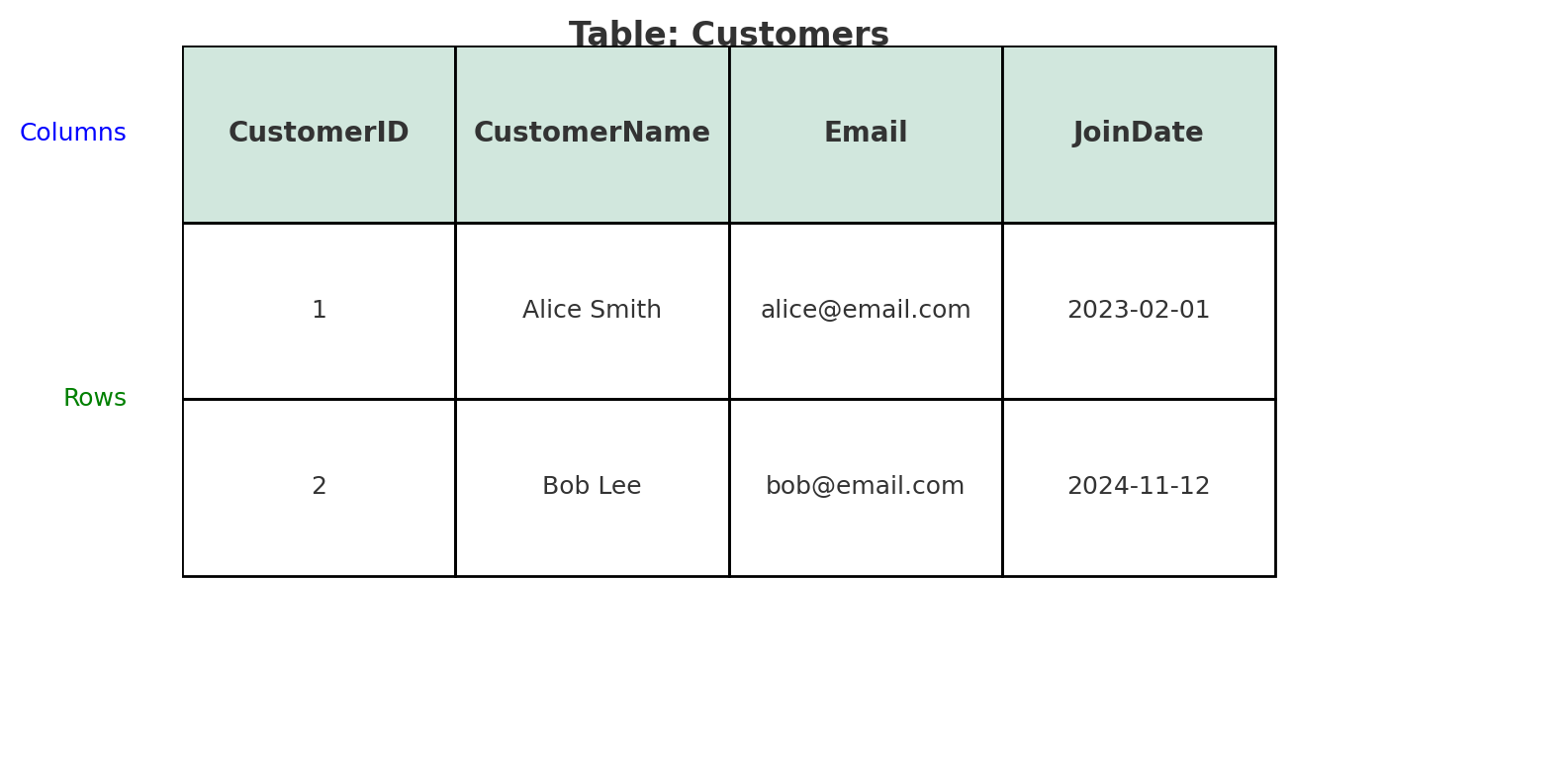
    A table in a database is like a spreadsheet. It organizes data into rows and columns. Each table holds information about a specific topic or entity, such as customers, products, or orders.

    Think of a table as a container for structured data.

    What is a Column in a Table?

    A column represents a specific attribute or field of the data stored in the table. Each column has:

    • A name (like CustomerName)
    • A data type (like Text, Date, or Integer)
    • A purpose (it stores the same type of information for all rows)

    For example, in a Customers table:

    • Each row = a single customer (record)
    • Each column = one attribute of that customer

    Why Tables and Columns Matter

    • Organization: Keeps data structured and easy to query
    • Relationships: You can connect different tables (e.g., Orders table linked to Customers by CustomerID)
    • Efficiency: Columns allow databases to index and retrieve data faster
    • Clarity: Makes data easy to understand and analyze

    Quick Analogy

    Imagine a table as a class register:

    • Each row is a student
    • Each column is a student detail (name, age, grade, etc.)
  • Understanding Data Types: The Building Blocks of Clean Data

    What is a Data Type?

    A data type defines the kind of data a variable or column can hold. It’s a classification that tells a computer how to interpret and store the data.

    Common data types include:

    • Integer (e.g., 10, -5)
    • Float/Decimal (e.g., 3.14, -0.99)
    • String/Text (e.g., “Hello World”)
    • Boolean (e.g., true, false)
    • Date/Time (e.g., 2025-04-20, 12:30:00)
    • Binary (e.g., image files or other non-text data)

    Why Do We Need Data Types?

    1. Storage Efficiency
      Data types help systems allocate the right amount of memory. For example, storing a number takes less space than a paragraph of text.
    2. Data Validation & Integrity
      Prevents invalid data entry. For example, if a column is set to accept only dates, users can’t enter random text like “apple”.
    3. Faster Processing
      Knowing the data type allows the computer to process the information more efficiently.
    4. Function Behavior
      Certain operations only make sense for specific types. For instance, you can add two numbers but not two dates unless you’re doing date math.

    How It Helps in Real Life

    • In a banking app, your account balance is stored as a decimal type to ensure precision.
    • In healthcare data, a patient’s birthdate is a date type, so age calculations are accurate.
    • In a survey, yes/no answers are stored as boolean, making analysis faster and more logical.

    Conclusion

    Data types are the foundation of all data-driven systems. They help ensure that information is stored efficiently, used accurately, and protected from errors. Whether you’re building a database, writing code, or analyzing data, understanding data types is essential.

  • SQL: The Unsung Hero Behind Everyday Data Decisions

    In a world where data flows faster than water and decisions are driven by numbers, SQL—Structured Query Language—stands as the silent force powering the everyday lives of data enthusiasts. Whether it’s a business analyst, a healthcare data engineer, or a student exploring trends in member data, SQL is the universal translator that turns rows and columns into stories, patterns, and insights.

    A Day in the Life: How SQL Makes It All Happen

    Meet Tanya, a data analyst at a healthcare company. Her mornings begin not with coffee, but with a query:

    SELECT COUNT(*) 
    FROM Patient_Records 
    WHERE Admission_Date = CURRENT_DATE;

    This single line helps her team understand hospital load, plan staffing, and potentially save lives. The speed and precision of SQL allow her to go from question to insight in seconds.

    Later in the day, a sales manager pings her: “Can you show me which products performed best last quarter in Texas?”

    No problem. With SQL, she quickly joins tables, filters results, and aggregates numbers:

    SELECT Product_Name, SUM(Sales_Amount) AS Total_Sales
    FROM Sales
    WHERE Region = 'Texas' AND Sale_Date BETWEEN '2024-10-01' AND '2024-12-31'
    GROUP BY Product_Name
    ORDER BY Total_Sales DESC;

    Within minutes, decisions are made. Inventory is adjusted. Campaigns are planned. All thanks to SQL.

    Beyond the Office: SQL Everywhere

    SQL’s power isn’t limited to corporate settings. A data science student uses it to clean up messy CSVs before training a machine learning model. A content creator queries their video performance data to find what resonates with their audience. Even popular no-code platforms use SQL in the backend—users just don’t realize it.

    SQL has quietly become the literacy of the digital age—easy to learn, yet powerful enough to manipulate billions of records. It brings order to chaos, speed to curiosity, and action to analysis.

    Why Data Enthusiasts Love It

    • Readable and expressive: Even non-technical users can understand basic SQL.
    • Versatile: From PostgreSQL to Snowflake, SQL powers almost every data platform.
    • Fast prototyping: It helps analysts and engineers test hypotheses before coding full models.
    • Collaborative: SQL queries are easy to share, tweak, and document.

    Conclusion: The Backbone of Data Curiosity

    SQL may not wear a cape, but it saves the day—every day—for data enthusiasts around the globe. It fuels dashboards, feeds reports, and answers the most important question: Why?

    So the next time you see a chart, get an alert, or read a number in a business meeting, remember—SQL probably got it there first.